1
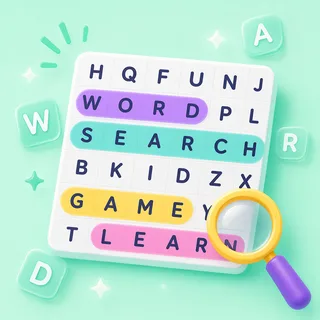
Words hide across, down, and diagonally.
On Easy they keep to across and down; Hard hides them in all eight directions — including backwards.
Find hidden words in a letter grid.
The puzzle that settles a room. Put this week's spelling list in a grid and it becomes quiet, purposeful hunting — perfect for early finishers, soft starts, or the ten minutes before the bell.
Also known as: word find · hidden words
That's the goal — no rules to teach. Here's how a round of Word Search runs.
On Easy they keep to across and down; Hard hides them in all eight directions — including backwards.
A finger on the touchboard works like the mouse — and a trace counts forwards or backwards. Wrong trail? A quick red flash and the hunt goes on.
Found words lock in colour and strike off the list — the round ends the moment the last one lands, or when the timer runs out.
The same Word Search works as a front-of-class hunt, a live device race, or take-home practice. Pick at press-play — nothing to rebuild.
Project one grid and the whole class hunts together — students call the hiding spots while you (or the kid whose turn it is) drags. No devices, no setup, no codes.
Zero devices · zero prepStudents go to boardee.app/join and type the six-digit code — phones, tablets, chromebooks, any browser. Everyone races the same puzzle on their own screen, and the leaderboard counts words found.
Join code or QR · no student accountsShare one play link and the same puzzle becomes homework, a soft start or early-finisher work. Results roll in as each student finishes — words found and time, no chasing.
One link · results tracked for youSpelling words, unit vocab, French verbs — if you can list it, the grid can hide it. Type the topic; AI writes the list and builds the puzzle.
The Arcade is a library of classroom games that all drink from the same topic box. When the grid's been solved, the identical word list becomes a crossword, a Wordee round or a matching game — same topic, new game, zero re-typing.
Ready-made from the Discover shelves, AI-built from your topic, or typed by hand — every door ends at the same play button.
Search the Discover shelves — curated games plus rounds shared by other teachers. Find one that fits and press play.
Type what you're teaching and the Arcade writes your Word Search in under a minute. Check it, tweak anything, play.
Every Word Search has a plain editor underneath — your exact list, row by row, no AI in the loop.
Every Arcade game starts from the same box: type what you're teaching and the content writes itself — questions, words, clues — ready for the board at the front of the room.
Game types in the Arcade — one topic box fills them all
From typing a topic to pressing play
Student accounts — a code and a first name is the whole login
Steps every time: type it, check it, play it
As many as join. Put one grid on the projector and let tables race to spot words, or run a live round where every student hunts the same puzzle from their own device.
No. It works fully on the projector. For individual play, students join from any browser with a code, or you can share a play link — nothing to install.
Yes. Give it a topic and grade level — or paste your own word list — and it builds the grid in under a minute. Ready-made packs are there when you're in a hurry.
Grid sizes run from 8×8 up to 20×20, with easy, medium and hard settings — Hard hides words in all eight directions — plus a timer you can set and a word list you can show or hide.
Never. Students join with a code and a name — no emails, no passwords. Teachers don't need an account to try it either.
Same three steps, different game. Type a topic and pick your shape.

Type it in, check the content, press play. The Arcade does the rest.